Hello World
We will create a script that construct a unit square grid with Kaskade 7.
Makefile Preparation
Let us create a basic makefile to make use of Kaskade 7 later when we compile the script. In the terminal, we begin by creating a directory and a makefile:
mkdir helloworld
cd helloworld
touch Makefile
The following is a simple example of the makefile for the purpose of this tutorial. Please note that you should replace #MAKEFILE_LOCAL_LOCATION# with the file path of “Makefile.Local” in the installation directory of Kaskade 7.
include #MAKEFILE_LOCAL_LOCATION#
include $(KASKADE7)/Makefile.Rules

ALLLIBS = $(KASKADELIB) $(DUNELIB) $(UGLIB) $(BOOSTLIB) $(UMFPACKLIB) $(BLASLIB) $(FTNLIB) $(NUMALIB)

helloworld: helloworld.o $(KASKADE7)/libs/libkaskade.a
	$(CXX) $(FLAGS) $< $(KASKADE7)/libs/umfpack_solve.o $(ALLLIBS) $(LINKFLAGS) -o $@
In case you have Kaskade 7 installed on the machines at ZIB the path to the makefile should look like this: /data/numerik/people/<username>/…/kaskade7/Makefile.Local.
Grid and Variable Set Initialization
We will begin by defining a grid for our domain, and the variable \(u\) (function) on such domain. Begin by creating a CPP file named helloworld.cpp in the same directory with the following codes.
#include <iostream>

#include "dune/grid/config.h"
#include "dune/grid/uggrid.hh"

#include "fem/gridmanager.hh"
#include "fem/lagrangespace.hh"
#include "fem/variables.hh"

#include "io/vtk.hh"
#include "linalg/direct.hh"
#include "utilities/gridGeneration.hh"

using namespace Kaskade;

int main()
{
  std::cout << "Hello World!" << std::endl;

  constexpr int dim = 2;
  constexpr double side_length = 1;
  constexpr int refinements = 5;
  constexpr int order = 2;

  // define the square grid
  using Grid = Dune::UGGrid<dim>;
  GridManager<Grid> squareGM( createUnitSquare<Grid>(side_length) );
  squareGM.globalRefine(refinements);

  // construction of finite element space for the scalar solution u.
  using LeafView = Grid::LeafGridView;
  using H1Space = FEFunctionSpace<ContinuousLagrangeMapper<double,LeafView>>;
  H1Space squareSpace(squareGM, squareGM.grid().leafGridView(), order);

  using Spaces = boost::fusion::vector<H1Space const*>;
  Spaces squareSpaces(&squareSpace);

  using VariableDescriptions = boost::fusion::vector<Variable<SpaceIndex<0>,Components<1>>>;
  using VariableSetDesc = VariableSetDescription<Spaces,VariableDescriptions>;
  VariableSetDesc squareSpacesVarSetDesc(squareSpaces,{ "u" });
  auto u = squareSpacesVarSetDesc.variableSet();

  // visualize the grid with the variable u initialized as zero everywhere
  writeVTK(u,"square_grid",IoOptions().setOrder(order).setPrecision(7));
  std::cout << "Grid and initial variable defined" << std::endl;
}
Below is a breakdown of the important parts of the script.
In the first part we state the dimension of the grid type we will use. We create the unit square grid with the function createUnitSquare<Grid> from gridGeneration.hh, which is passed and wrapped in a grid manager. Grid managers take care of the internal complications so that grid refinement and be performed easily and consistently.
using Grid = Dune::UGGrid<dim>;
GridManager<Grid> squareGM( createUnitSquare<Grid>(side_length) );
squareGM.globalRefine(refinements);
We specified the type of grid view when we define the type of continuous Lagrange mapper. A leaf grid view (as opposed to level grid view) is adopted here. The concept of grid views comes from the Dune grid interface.
A continuous Lagrange mapper is a manager of degree of freedom for the continuous finite element function space of piecewise polynomials. Here order specifies the degree of the Ansatz polynomials considered in the function space.
using LeafView = Grid::LeafGridView;
using H1Space = FEFunctionSpace<ContinuousLagrangeMapper<double,LeafView>>;
H1Space squareSpace(squareGM, squareGM.grid().leafGridView(), order);
Sometimes we might consider a problem with more than one variable. In general we will need to pass a Boost vector of function spaces when we apply the later steps in the solver.
using Spaces = boost::fusion::vector<H1Space const*>;
Spaces squareSpaces(&squareSpace);
To specify the function variable we need for the problem, in our case the variable \(u\). we will need to define the type VariableSetDescription which links the type of function spaces (a vector) and a vector of variables. When we define the variable vector type, called VariableDescriptions here, we need to specify each of their space indices and components.
Space index defines the order we arrange the variables and should range from \(0\) to \(n-1\), where \(n\) is the number of variables in consideration. Component refers to the dimension of the output of the functional variable, which should be one unless vector functions are in consideration. We also use a string “u” to name the variable, which will be important when we need to identify the values in the results.
using VariableDescriptions = boost::fusion::vector<Variable<SpaceIndex<0>,Components<1>>>;
using VariableSetDesc = VariableSetDescription<Spaces,VariableDescriptions>;
VariableSetDesc squareSpacesVarSetDesc(squareSpaces,{ "u" });
auto u = squareSpacesVarSetDesc.variableSet();
Visualization of the Grid Using ParaView
The script outputs the variable u as a VTK file without performing any calculation. We can visualize the grid using software like ParaView. Before we execute the script, we should create an empty header file laplace.hh (details of this header file will be provided in later session) because our CPP file contains a line that imports the content of such header file.
Run the following command in the terminal to create a D file needed for the future make commands.
make helloworld.d
Then we can compile the script by running
make helloworld
To execute the script, we use the command
./helloworld
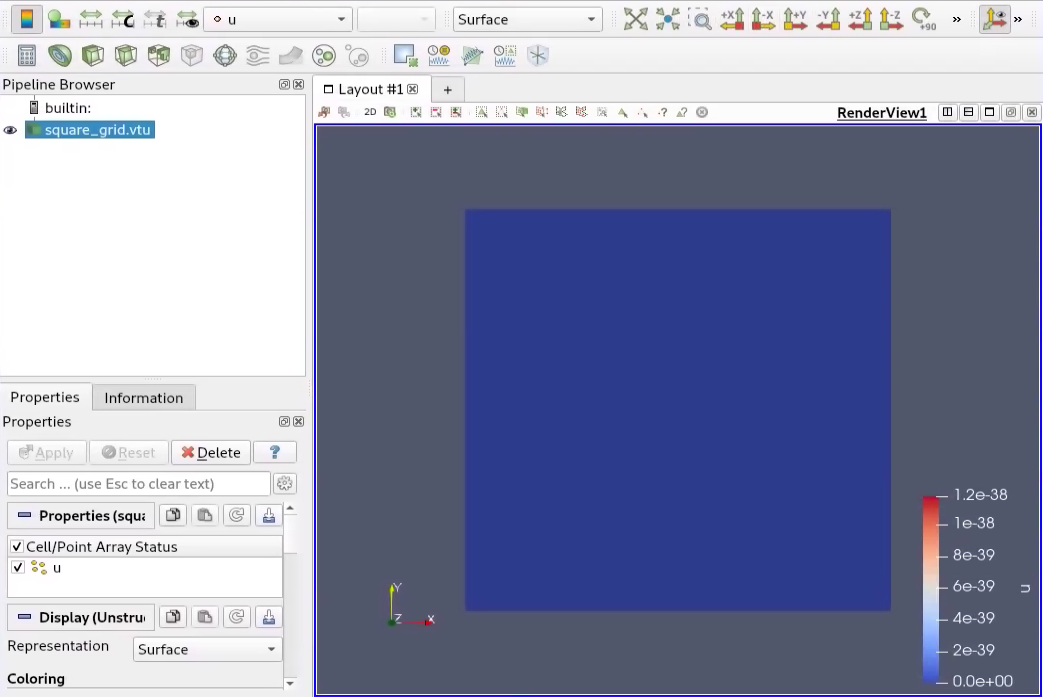
After which we should find the file square_grid.vtu created from the program. In this tutorial, we will visualize it using ParaView, where a unit square with a value of zero should be observable once the file is loaded.
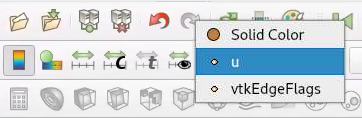
When there are more than one variables, it is possible to choose another variable in the drop down menu:
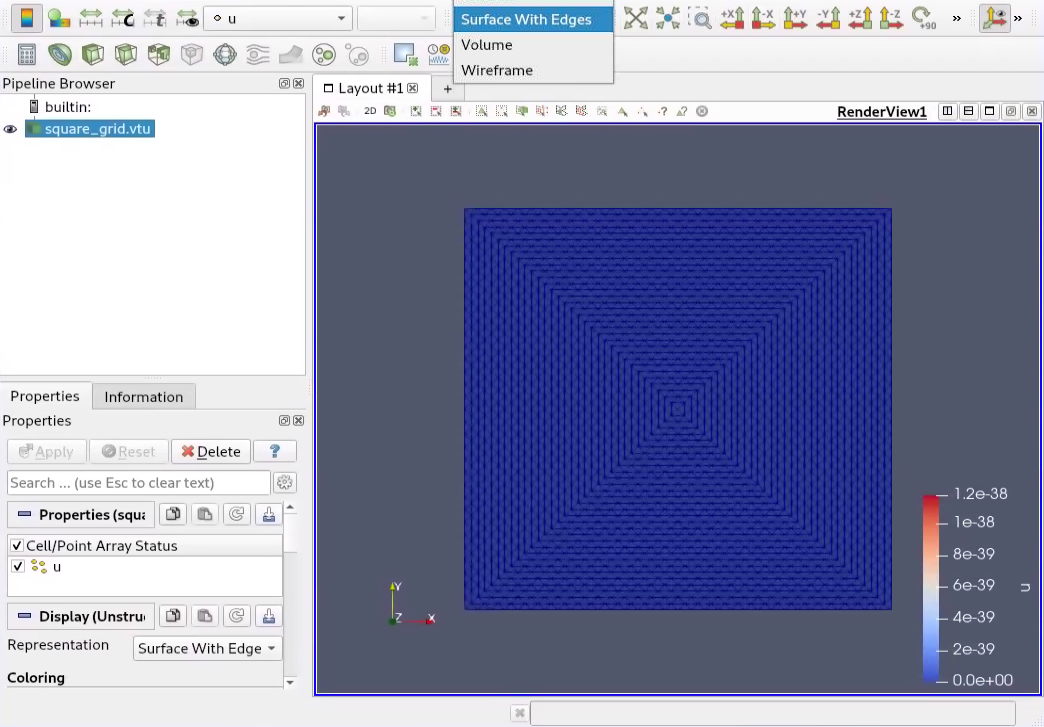
It is also possible to view the grid with the grid lines:
Page last modified: 2022-01-11 15:16:35 +0100 CET