Geometry Definition
To set up a PDE problem, it is required to create a grid (mesh) and handle grid refinements, prolongations and so on. Input formats for reading of complex geometries as well as the creation of simple geometries are described here, accompanied by code snippets and examples as well as hints and tipps. Some helpful external tools for the creation and processing of complex geometries are presented. The results of computations can be written with the underlying grid into files of various formats.
Introduction: Grid creation and formats
There are basically two ways to create a grid in KASKADE7: By providing externally created geometry files or by internally defining nodes and vertices of the grid manually and using routines and libraries provided by DUNE. In KASKADE7, the grid creation is separated from the finite element code by using interfaces from Dune. Grids work on different element types in 1D, 2D and 3D, e.g. simplices like triangles, tetrahedra, prisms, pyramids and cubes. Currently, the file formats .vtu, .am, .msh can be used for geometry input files and the file formats .vtu, .am, .marc can be used for writing output files.
In general, follow these steps for working with grids in KASKADE7:
- Define
includedirectives - Specify necessary parameters (dimension, number of refinements, geometry file, …)
- Chose Dune grid type (UG, ALU, OneD, …)
- Create
GridManagerwhich holds the grid in KASKADE7 - Refine grid
- Write output of calculations with grid into a file
Common grid types
Grids are maintained by DUNE, a modular toolbox for solving PDEs with grid-based methods. DUNE provides interfaces to use libraries for grid management like UG (Unstructured Grids) or ALU (Adaptive Loadbalancing Unstructured) to create objects of type Dune::UGGrid<dim>, Dune::ALUGrid<dim> etc. for dimensions of size 2 and greater and Dune::OneDGrid for dimension 1 which allow adaptive refinement. More Dune grids: Dune project grids. By the KASKADE7 grid manager class, the grid is then handed over from DUNE to KASKADE7 which now owns the grid and where the grid can be modified. Include directives for the different grid files as well as files for grid generation etc. have to be set at the beginning of each program and the according libraries like $(UGLIB) or $(ALUGRIDLIB) have to be included in the Makefile.
Common file formats
| file format | software |
|---|---|
| vtu/vtk | Paraview |
| am | Amira (commercial) |
| msh | gmsh |
Creation of simple geometries
Using Kaskade 7 functions
Kaskade 7 provides functionality in utilities/gridGeneration.hh for directly creating grids for simple geometric shapes such as rectangles or cuboids, L/T/U-shapeddomains, cylinders, and a few Platonian solids - have a look at the Kaskade 7 doxygen documentation for a full list of available functions. Attention: Please note the orientation of the axis for creation of the geometric shapes (x: front/back, y: up/down, z: left/right).
To create a simple UG grid on a unit square, the function createUnitSquare can be used. It creates an object of type Dune::UGGrid<dim> (better to say a smart pointer that owns and manages the object) which can be then handed over to KASKADE7 by the grid manager. The side lengths of the subsquares can be defined by an input parameter which is set to 1 by default. In the following example the side lengths are set to 0.25 and the grid is refined afterwards as often as stated in parameter refinements, yielding a triangular mesh:
#include "dune/grid/uggrid.hh"
#include "fem/gridmanager.hh"
#include "utilities/gridGeneration.hh"
[...]
using Grid = Dune::UGGrid<dim>;
GridManager<Grid> gridManager(createUnitSquare<Grid>(0.25));
gridManager.globalRefine(refinements);
Similarly, a UG grid on a unit cube can be defined by createUnitCube, yielding a tetrahedral mesh. Here, the side lengths of the subcubes are set by default to 1:
using Grid = Dune::UGGrid<dim>;
GridManager<Grid> gridManager(createUnitCube<Grid>());
gridManager.globalRefine(refinements);
To create a cube with other side lengths, use the createCuboid method. There are further methods to create domains of simple shapes. This L-shaped domain for example is starting (lower left corner) at position vec (2,2,2) with thickness thick describing the widths of the shape, lengths 3.0 and 4.0 of the bars and side length 1.0 of the cubes that fill the shape:
using Grid = Dune::UGGrid<dim>;
Dune::FieldVector<double,3> vec(2.0), thick;
thick[0] = 1.0; thick[1] = 1.0; thick[2] = 2.0;
GridManager<Grid> gridManager(createLShape<Grid>(vec,3.0,4.0,thick,1.0));
Same holds for methods to create T-shaped domains, platonian solids, cylinders and so on.
Define grids manually
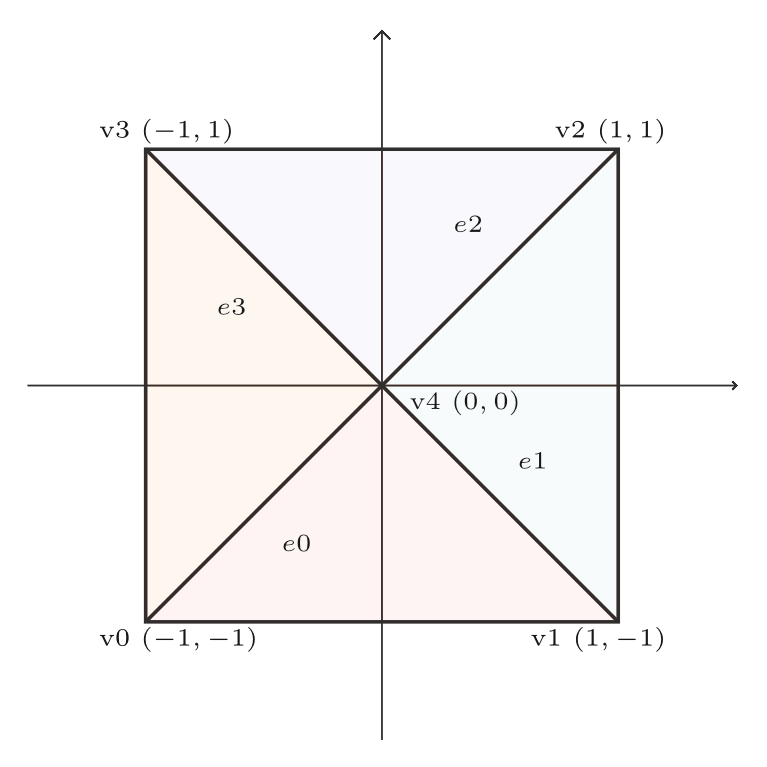
Using the grid factory from Dune, grids can be defined manually by specifying vertices and elements. From the resulting factory, a grid is created and refined afterwards. For dimension 2, an example of a simple geometry with a triangular grid is provided below. Vertices are numbered according to the order in which they are added to the factory, the same holds for elements.
#include "dune/grid/uggrid.hh"
#include "fem/gridmanager.hh"

[...]
constexpr int dim=2;
using Grid = Dune::UGGrid<dim>;
Dune::GridFactory<Grid> factory;

Dune::FieldVector<double,dim> v;
v[0]=-1; v[1]=-1; factory.insertVertex(v); // v0
v[0]= 1; v[1]=-1; factory.insertVertex(v); // v1
v[0]= 1; v[1]= 1; factory.insertVertex(v); // ...
v[0]=-1; v[1]= 1; factory.insertVertex(v);
v[0]= 0; v[1]= 0; factory.insertVertex(v);

std::vector<unsigned int> vid(3);
Dune::GeometryType gt(Dune::GeometryType::simplex,dim);
vid[0]=0; vid[1]=1; vid[2]=4; factory.insertElement(gt,vid); // e0: v0, v1, v4
vid[0]=1; vid[1]=2; vid[2]=4; factory.insertElement(gt,vid); // e1: v1, v2, v4
vid[0]=2; vid[1]=3; vid[2]=4; factory.insertElement(gt,vid); // ...
vid[0]=3; vid[1]=0; vid[2]=4; factory.insertElement(gt,vid);

GridManager<Grid> gridManager(factory.createGrid());
gridManager.globalRefine(refinements);
Geometry before refinement step
For grids with hexahedral (cubic) elements, change the geometry type from Dune::GeometryType::simplex to Dune::GeometryType::cube. You could as well consider using different libraries for grid generation like e.g. ALUGrid instead of UGGrid. The same holds for other types of grids, structured or unstructured. Note the correct ordering of the vertices here, shown in the Dune cheat sheet:
#include "dune/alugrid/grid.hh"
#include "fem/gridmanager.hh"

[...]
constexpr int dim=3;
using Grid = Dune::ALUGrid<dim,dim,Dune::ALUGridElementType::cube,Dune::ALUGridRefinementType::nonconforming>;
Dune::GridFactory<Grid> factory;

Dune::FieldVector<double,dim> v;
v[0]=0; v[1]=0; v[2]=0; factory.insertVertex(v); // v0
v[0]=0.2; v[1]=0; v[2]=0; factory.insertVertex(v); // v1
v[0]=0.2; v[1]=0.2; v[2]=0; factory.insertVertex(v); // v2
v[0]=0; v[1]=0.2; v[2]=0; factory.insertVertex(v); // v3
v[0]=0; v[1]=0; v[2]=0.2; factory.insertVertex(v); // v4
v[0]=0.2; v[1]=0; v[2]=0.2; factory.insertVertex(v); // v5
v[0]=0.2; v[1]=0.2; v[2]=0.2; factory.insertVertex(v); // v6
v[0]=0; v[1]=0.2; v[2]=0.2; factory.insertVertex(v); // v7

std::vector<unsigned int> vid(8);
Dune::GeometryType gt(Dune::GeometryType::cube,dim);
vid[0]=0; vid[1]=1; vid[2]=3; vid[3]=2; // e0: v0 -> v1 -> v3 -> v2
vid[4]=4; vid[5]=5; vid[6]=7; vid[7]=6; // e1: v4 -> v5 -> v7 -> v6
factory.insertElement(gt,vid);

GridManager<Grid> gridManager(factory.createGrid());
gridManager.globalRefine(refinements);
Input of complex geometry files
In contrary to manual creation of simple geometries as showed in the previous section, complex geometries are often resulting from segmented CT scans, modeling in Blender or provided by other sources. Therefore, readers for various file formats are available in KASKADE7 which have to be made available by the according include directives at the beginning of each program. This is shown in the subsequent examples.
Read .msh
For .msh geometry files (for example created in program Gmsh) a reader is provided by Dune which has to be included with the according directive. After setting a dimension with the dim parameter and the path to the geometry file, the code for reading the grid into KASKADE7 is as follows:
#include "dune/grid/uggrid.hh"
#include "dune/grid/io/file/gmshreader.hh"
#include "fem/gridmanager.hh"
[...]
std::string geoFile = "geometry.msh";
constexpr int dim = 2;
using Grid = Dune::UGGrid<dim>;

std::vector<int> bdry2PE, ele2PE;
std::unique_ptr<Grid> gridPtrAvatar(Dune::GmshReader<Grid>::read(geoFile,bdry2PE,ele2PE,true,false));
GridManager<Grid> gridManager(std::move(gridPtrAvatar));
gridManager.globalRefine(refinements);
Read .vtu
The file format .vtu (as well as .vtk) is used by the Visualization Toolkit for unstructured grids and relies on XML. Some graphic programs like Paraview can read and display .vtu and .vtk data. These files can be read and written by Kaskade 7 in ASCII or binary format. If there is trouble with reading binary .vtu, consider converting it to ASCII (e.g. in Paraview). If there is trouble with reading ASCII, make sure that the file has <?xml version="1.0"?> as first line.
#include "io/vtk.hh"
#include "io/vtkreader.hh"
[...]
std::string geoFile = "geometry.vtu";
using Grid = Dune::UGGrid<dim>;
VTKReader vtk(geoFile);
GridManager<Grid> gridManager(vtk.createGrid<Grid>());
To read material or other additionally provided data, after construction of involved finite element spaces this data can be read from the file into the coefficients. Assume the space is an L2 space and the data in the DataArray tag of the .vtu file has the name “Materials”:
L2Space<Grid> l2space(gridManager,gridManager.grid().leafGridView(),0);
auto material = l2space.element<1>();
vtk.getCoefficients("Materials",material);
Now the coefficients are available and can be accessed cellwise or pointwise via e.g. material.value().
Read .am
Amira mesh files with ending .am can be read and written in KASKADE7. The commercial software Amira is used for visualizing and processing data from scientific computations. The functionality depends on the not freely available libamiramesh library and may be somewhat unstable. It is possible to read Amira files and write them into .vtu for visualization in other programs.
#include "io/amira.hh"
#include "io/amirameshreader.hh"
[...]
std::string geoFile = "geometry.am";
using Grid = Dune::UGGrid<dim>;
Dune::GridFactory<Grid> factory;
DuneAmiraMesh<dim,dim,Grid> mesh(geoFile.c_str());
mesh.InsertUGGrid(factory);
GridManager<Grid> gridManager(factory.createGrid());
To read material or other additionally provided data, after construction of involved finite element spaces this data can be read from the file into the coefficients. Assume the space is an L2 space and the data in the .am file is written as parameter called “Materials”:
L2Space<Grid> l2space(gridManager,gridManager.grid().leafGridView(),0);
auto material = l2space.element<1>();
Kaskade::AmiraMeshReader::readData<int,Material>(geoFile, "Tetrahedra", "Materials", material);
Now the coefficients are available and can be accessed cellwise or pointwise via e.g. material.value().
Grid refinement
Coarse input geometries can be automatically refined in KASKADE7. The grid manager takes care of the grid after modifications like refinement. The parameter refinements determines how often the grid shall be refined uniformly. Hence, after defining the grid manager und handing over the grid, the refinement is carried out with
gridManager.globalRefine(refinements);
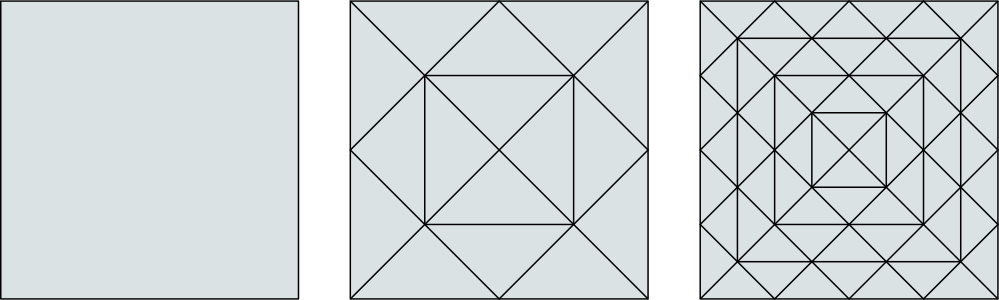
This refines each leaf cell of the grid in a certain way (read more about leaf and levels in Dune grids here). As an example, this is the plain 2D square before and after one and two refinement steps:
Plain square before and after two refinement steps
Adaptive grid refinement
Read more about error estimation and adaptive mesh refinement in section Adaptivity.
Hints and tipps
Show information about the grid:
std::cout << std::endl << "Grid: " << gridManager.grid().size(0) << " tetrahedra, " << std::endl;
	     std::cout << "      " << gridManager.grid().size(1) << " triangles, " << std::endl;
	     std::cout << "      " << gridManager.grid().size(dim-1) << " edges, " << std::endl;
	     std::cout << "      " << gridManager.grid().size(dim) << " points" << std::endl;
Input of parameters like refimenent steps or geometry files from command line:
The parameter refinements determines how often the grid shall be refined uniformly. Parameters like this are usually defined as parameter which can be extracted from command line arguments via getKaskadeOptions or getParameter from class Options, defined in kaskopt.hh.
#include "utilities/kaskopt.hh"
[...]
std::string geoFile;
int refinements;

if (getKaskadeOptions(argc,argv,Options
	("geometry", geoFile, "geometry.msh", "computational domain/geometry")
	("refinements", refinements, 0, "defines how often the original grid will be refined (set to 0 by default)")
	))
return 1;
The grid can possibly be reported to be not thread-safe, then sequential computation of the assembly is performed. Lie about thread-safety of the grid if implementation is believed to be thread-safe so the computation is performed in parallel:
gridManager.enforceConcurrentReads(true);
If the grid access may not be thread-safe, consider the use of class GridLocking:
std::unique_lock lock(GridLocking<Grid>::mutex());
[...]
lock.unlock();
Working with grids in KASKADE7: Basic concepts
TODO To work with grids and access or iterate over elements, faces and vertices (nodes), knowledge about certain concepts like local and global coordinates, methods for accessing grid entities …… is required.
Traversing the grid
Sometimes it is required to access elements or certain faces (all, boundary, inner) directly. To access elements or vertices, Dune provides functions like elements() or vertices() which expect a GridView object. Its use is demonstrated here by iterating over e.g. the elements of a grid:
auto const& view = gridManager.grid().leafGridView();
for(auto const& element : Dune::elements(view){
  [...]
}
For iterating over certain entities, KASKADE7 provides functions for easier access using functors and lambdas in forEach.hh. For example, this lambda can be used for iterating over all boundary faces, such that each face is visited once:
auto const& view = gridManager.grid().leafGridView();
forEachBoundaryFace(view, [&](auto const& face){
  [...]
});
Local and global coordinates
Depending on what is required for a calculation, methods can return coordinates in different ways. When working with positions in a grid, it must be paid attention to get the positions’ correct coordinates. Mainly, these four concepts for grid coordinates are relevant, and Kaskade 7 provides telling typedefs for some of them:
- global world coordinates:
GlobalPostion<Grid> - global reference element coordinates
- local world coordinates
- local reference element coordinates:
LocalPosition<Grid>
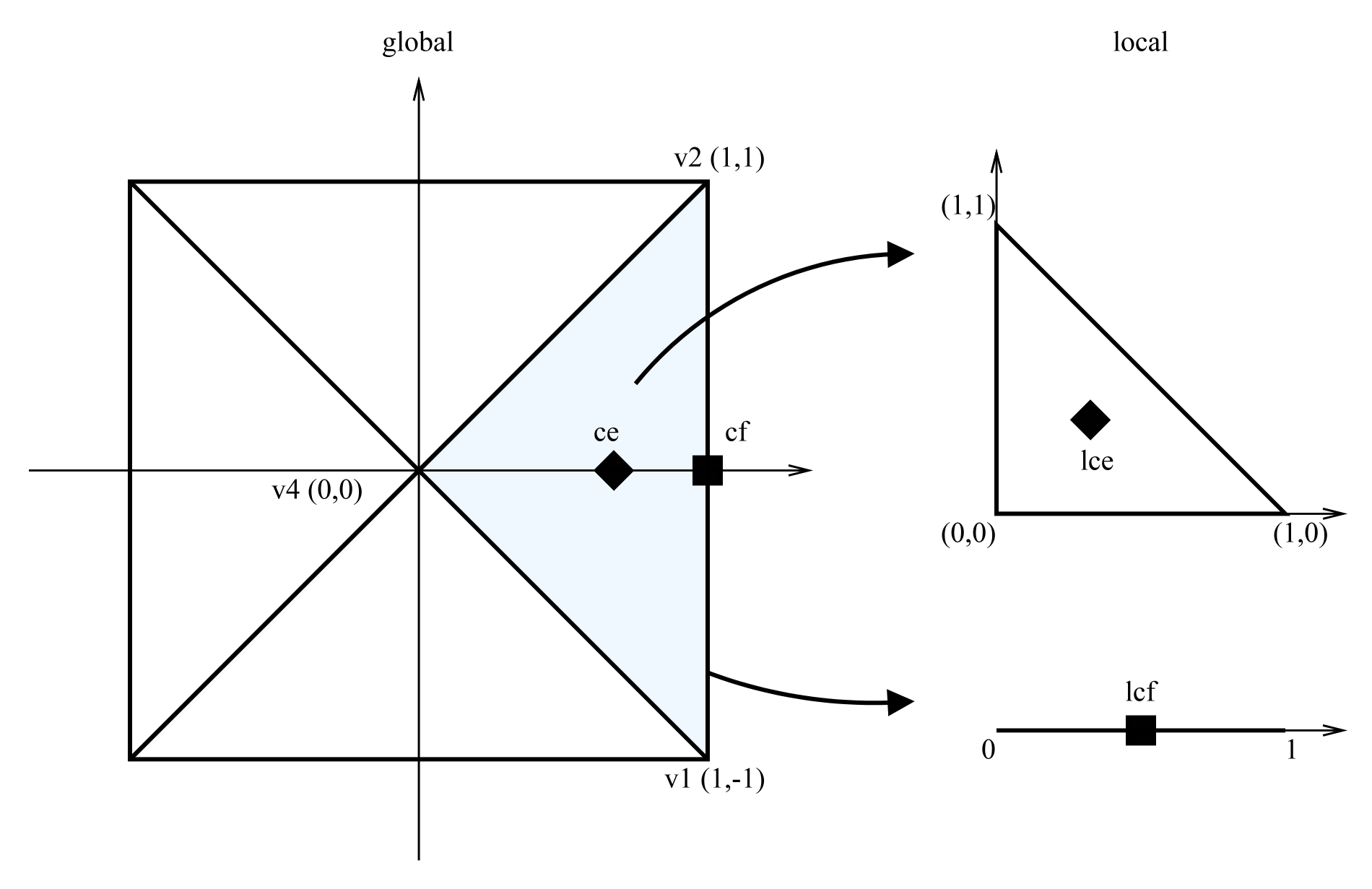
Global coordinates are coordinates in the physical space, while local coordinates are coordinates of the local space, expressed in the dimensionality of the current entity (cell, face, …). Hence, as an example, in a 2-dimensional setting, the global coordinates as well as the local world coordinates and local coordinates of an element are 2-dimensional, while the local coordinates of a face are 1-dimensional.
The coordinates are accessed with Dune methods, working on geometry objects. A geometry object represents the mapping from reference elements to world coordinates. Corners and centers of entities can be easily accessed this way, and global coordinates can be converted to local coordinates and vice versa.
The example below shows the differences between the coordinate types, according to the figure. Center depicts the mapping of the centroid (geometric center) of the reference element to the element in physical space. In the associated code snippet, the object Dune::FieldVector of type double is of dimension 1 or 2.
Dune::FieldVector<double,1> lcf,lcfi;
Dune::FieldVector<double,2> ce, lce, gce, cf, gcfi;

ce = element.geometry().center();           // global world, dim 2  // (0.66,0)
lce = element.geometry().local(center);     // local cell, dim 2    // (0.33,0.33)
gce = element.geometry().global(lce);       // = ce again

cf = face.geometry().center();              // global world, dim 2  // (1,0)
lcf = face.geometry().local(cf);            // local face, dim 1    //  0.5
gcf = face.geometry().global(lcf);          // = cf again

gcfi = face.geometryInInside().global(lcf); // global cell, dim 2   // (0.5,0)
lcfi = face.geometryInInside().local(cf);   // local world, dim 1   //  1
Helpful software
For software related to pre- and postprocessing of geometries, please have a look at the references section.
Page last modified: 2022-01-11 21:22:05 +0100 CET